





















Now Reading: Download e-Aadhaar online via UIDAI portal: step-by-step guide
-
01
Download e-Aadhaar online via UIDAI portal: step-by-step guide


The Story in Brief
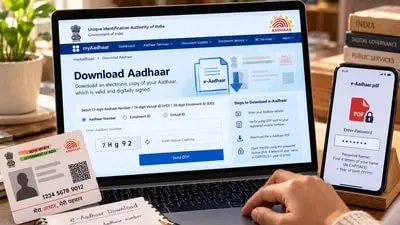
Residents can download a digitally signed e-Aadhaar PDF through UIDAI’s official myAadhaar portal without needing a physical card. The process requires a 12-digit Aadhaar number or Enrolment ID, access to the registered mobile number for OTP authentication, and completing a security verification on the screen. The downloaded PDF is password-protected: the first four letters of the name in capitals plus the four-digit birth year, such as RAHU1998 for Rahul born in 1998.
UIDAI states e-Aadhaar is legally valid and equivalent to the physical Aadhaar letter, with a digital signature and QR code for verification. Holders who no longer have access to their registered mobile number may be unable to complete OTP-based authentication and are advised to check UIDAI’s official guidance for alternatives. Users should never share their OTP and should use only official UIDAI services to enter Aadhaar details.
Indian Opinion Analysis
The step-by-step guide on UIDAI’s e-Aadhaar process leaves key gaps unresolved. Residents who have lost access to their registered mobile number cannot complete the default OTP authentication, and the story only advises checking UIDAI’s ‘official guidance for available alternatives’ without naming those alternatives. The password format, first four capital letters of the name plus birth year, also assumes the name recorded exactly matches Aadhaar records, yet no correction mechanism is provided for mismatches. The logical next step is for UIDAI to publish a clear, searchable alternative authentication path for residents with changed or lost phone numbers.
Source: hindustantimes.com
This brief was synthesised by AI from the source linked above. Methodology and corrections.