






















Now Reading: How to download Pinterest Pins, videos and boards offline
-
01
How to download Pinterest Pins, videos and boards offline



Pinterest’s Save button stores a Pin on a board but does not place a file on a phone or computer. For offline access, users can download certain image Pins through Pinterest’s three-dot…
The Story in Brief
Pinterest’s Save button stores a Pin on a board but does not place a file on a phone or computer. For offline access, users can download certain image Pins through Pinterest’s three-dot menu. Public images and videos without that option can be downloaded through a separate browser service such as Pinpea by copying the exact Pin link, pasting it into the service and checking the preview before downloading.
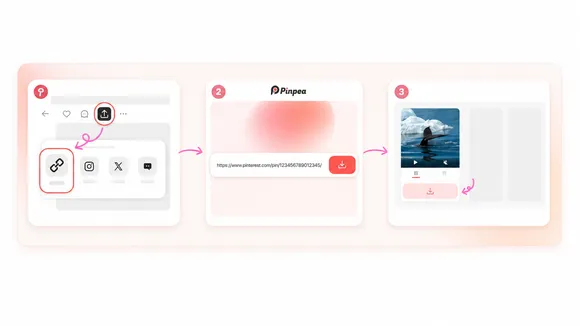
Pinpea supports public individual Pins and can currently download up to 16 images from a public board in one batch. Secret, private, removed or restricted Pins are unavailable through an ordinary public link. Files usually appear in Downloads, Gallery, Photos or Files, depending on the device and browser. Users are advised to retain the original Pin link alongside downloaded files.

The Indian Opinion
The lazy narrative is that saving a Pin guarantees offline access, while the opposite exaggeration is that every download tool is automatically unsafe or useless. The practical distinction is simpler: Pinterest’s Save feature is a bookmark, while a download creates a local file. Third-party services also require care, particularly with public links and source attribution. The useful test is whether the file opens without an internet connection and whether its original creator can still be identified.
Source: greaterkashmir.com
This story was synthesised by AI from the source linked above.